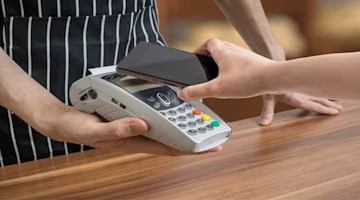
What is Samsung Pay and how can I use it?


Key takeaways
Allows you to tap your phone at checkout terminals to pay for goods and services
Clever technology allows compatibility with both old and new card readers
No specific limit for Samsung Pay itself, but merchant limits – often £100 or more – still apply

What is Samsung Pay?
Launched in 2015 as a rival to Apple Pay, Samsung Pay gives users a seamless way to make purchases with just a tap of their Samsung devices.
Samsung pay helps remove the need for bulky wallets stuffed with cards and cash. Instead, as part of a digital wallet – in this case the Samsung Wallet – it can make transactions quicker, simpler, and more secure.
How does Samsung Pay work?
Samsung Pay leverages two main technologies to facilitate contactless payments: NFC and MST.
NFC
Near Field Communication (NFC) is the backbone of modern contactless payment systems. It allows two devices to communicate when they're within 4cm of each other.
This tech is what makes it possible to tap your phone at a checkout terminal and pay without ever swiping a card or exchanging cash.
MST
Magnetic Secure Transmission (MST) is Samsung Pay's ace in the hole. It emits a signal that mimics the magnetic stripe on traditional payment cards.
This means that even if a retailer hasn't upgraded to the latest contactless payment terminals, you can still use Samsung Pay, making it incredibly versatile.
Where can you use Samsung Pay?
Samsung Pay is widely accepted at locations that display the contactless logo. Thanks to MST technology, you can also use it with older card readers.
It's compatible with a range of Samsung devices, including the Galaxy Note, S, A, and J series, as well as Gear S3, S2, and Gear Sport smartwatches.
How do I set up Samsung Pay?
On your smartphone: Getting started with Samsung Pay on your smartphone is straightforward. Open the 'Apps' section, sign in with your Samsung account, and choose a secure method like a fingerprint or PIN for verification. From there, you can add your credit and debit cards – up to 10 of them – and you're ready to go.
On your smartwatch: For those who prefer to keep their phone tucked away, Samsung Pay on your smartwatch works equally well is the perfect companion. Use the Galaxy Wearable app to import your cards, and after a quick verification, your wrist becomes your wallet.
How secure is Samsung Pay?
When it comes to mobile payments, security is paramount. Samsung Wallet takes this seriously, offering:
Iris scanner: A futuristic way to authenticate using your eyes
PIN verification: A tried-and-true method for securing payments
Fingerprint verification: A quick and personal way to authenticate transactions
Moreover, Samsung Pay also uses tokenisation, creating a unique number for each transaction, which means your actual card number stays private.
And if your smartphone goes missing, Samsung's got your back with can the ability to issue a new Samsung Pay + number and block any unauthorised transactions.
Is Samsung Wallet different from Samsung Pay?
Samsung Pay is one of the functions of Samsung Wallet, but the digital wallet isn't just for payments. It's a digital wallet that can store loyalty cards, train tickets and boarding passes for flights.
It can also act as your transport card for tap-and-go payments on services like Transport for London. Look for the contactless payment symbol, and you're good to go.
What are the pros and cons of Samsung Pay?
Samsung Pay offers a wealth of benefits:
Safe and secure: Multiple layers of security for peace of mind
Convenience: Your wallet is now digital
Loyalty cards: Store and use them all in one place
Beyond phones: Works with select Samsung smartwatches
MST technology: Compatible with traditional card readers
However, it's not without its has a few drawbacks:
Limited acceptance: Not all banks and retailers are on board yet
Device restrictions: Only available on certain Samsung models
How much can I spend on Samsung Pay?
In the UK, Samsung Pay is supported by banks like HSBC, Nationwide, Santander, American Express, Starling Bank, and Wise.
While there's no specific limit for Samsung Pay itself, the merchant's limit – often £100 or more – may apply.
Other useful guides
If you’re looking for more information about debit and credit card payments, check out our guides on:
Comparing credit cards with MoneySuperMarket
When it comes to shopping for credit cards, MoneySuperMarket allows you to compare credit cards from a variety of UK providers, many of which are compatible with Samsung Pay.
Before you apply for a new credit card, use our Eligibility Checker tool. It's a smart way to see which cards you might qualify for without impacting your credit score.
MoneySuperMarket is a credit broker – this means we’ll show you products offered by lenders. We never take a fee from customers for this broking service. Instead, we are usually paid a fee by the lenders – though the size of that payment doesn’t affect how we show products to customers.
Author
Tim Heming
Personal Finance Expert
Tim Heming is a journalist and editor who has written about personal finance for national newspapers and consumer websites for 15 years. Tim enjoys providing no-nonsense information to help consumers...

Reviewer
Victoria Russell
General Manager - Commercial
Vikki has worked across financial services for over 20years, and for the last 15 years, created and nurtured a career within MoneySuperMarket Group, leading to her current role as General Manager for...